Note: This Quick Byte is an application of the IoT Gateway’s email feature using a CM2302 Temperature and Humidity Sensor. A Propeller 2 Live Forum on YouTube provides a detailed presentation of the entire IoT Gateway (as of February 2022). The complete, detailed, setup process of the full P2 IoT Gateway on a Raspberry Pi (email, web control, etc) is documented on the IronSheep P2 IoT Gateway GitHub. Use this Quick Byte in conjunction with those two resources for a fully informed, successful setup!
Description
The Propeller 2 IoT (Internet of Things) Gateway lets the P2 securely send an email through the Raspberry Pi (RPi) to one or more recipients. This Quick Byte demonstrates the email feature by using a CM2302 Temperature and Humidity Sensor. As a P2 beginner and first-time Raspberry Pi user, the new skills I acquired were basic Linux commands to navigate directory structures and using Nano to edit files.
The Spin2 source code for this project is available below and can be easily adapted for other uses. Applications with the P2 could include monitoring of many analog inputs or sensors in remote locations.
Benefits of the P2 RPi IoT Gateway for email:
- Easy setup on Raspberry Pi consists of configuring Python scripts from GitHub
- Uses external SendGrid account with API key; no password or login credentials stored on the P2 or RPi
- Compatible with the low-cost Pi Zero for production projects using the P2 Edge
- Hardware connection is serial I/O between the P2 and RPi
- Lightweight Spin2 driver communicates with the scripts on Raspberry Pi; configure the top-level object with your email addresses and content
- Spin2 driver supports the use of formatted strings for sending numerical values
- RPi configuration and P2 programming can also be done remotely using SSH/VNC access to Raspberry Pi with Eric Smith’s FlexProp installed for P2 programming
The setup process for this project can be done in the following sequence:
- Raspberry Pi configuration. Loading Python scripts and running the IoT Gateway Create a SendGrid account and configure an API key. The code and documentation for this are found on IronSheep P2 IoT Gateway GitHub
- Propeller 2 circuit building and connection to RPi
- P2 P0 to RPi P25 (serial Rx to Pi)
- P2 P1 to RPi P24 (serial Tx to Pi)
- P2 P8 to CM2302 Temperature and Humidity Sensor (also connect the sensor to Vdd and Vss)
- Test the CM2302 as a subsystem using this Quick Byte
- Load the example code and send an e-mail (following is using Propeller Tool; FlexProp is similar)
- Insert your own e-mail addresses in the Spin2 code
- Press F11 to compile and flash
- Press F12 to open Parallax Serial Terminal. Within Parallax Serial Terminal, press a key in the transmit pane to refresh the display and send the email
Connection between P2 Edge, CM2302 Temperature and Humidity Sensor, and Raspberry Pi:
Insert your email addresses in the highlighted lines in the sample code DAT section:
DAT { our email and hardware ID strings }
p2HardwareID byte "P2 Edge - GWDemo1",0
emailTo byte "kgracey@parallax.com",0
emailFrom byte "kgracey@parallax.com",0
emailSubj byte "Message from the Propeller 2",0
emailBody byte 0[1024]
' 1K bytes to format the email text
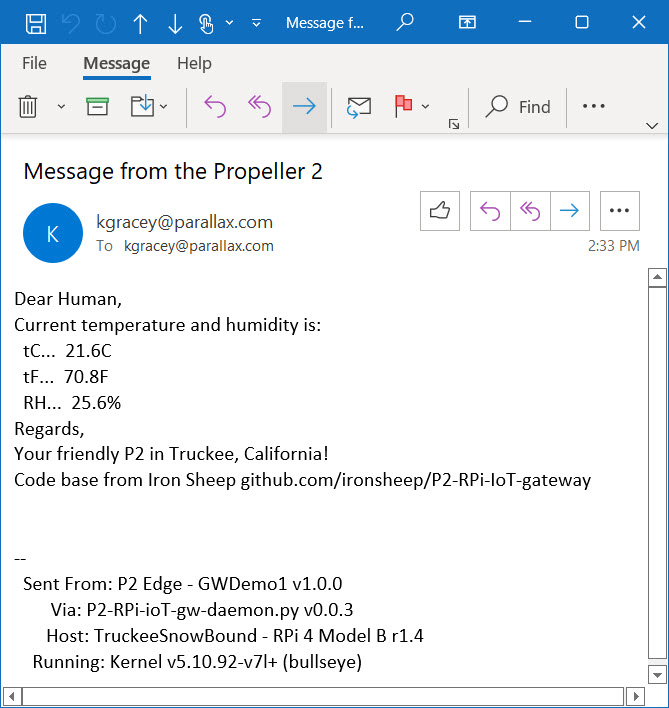
E-mail sample:
Document Author
- Ken Gracey
Source Code Author
- Stephen Moraco
- Ken Gracey
- Jon McPhalen